
Zulip
Your team chat. Your AWS account. Nobody else's servers.
A production-ready Zulip deployment in your own AWS account in about 20 minutes — the open-source, threaded team chat platform, configured the way an AWS consultancy would do it for a growing team.
Deploy on AWS Marketplace →Organized Team Chat, Without Per-Seat Pricing
Engineering Teams
Threaded discussion that keeps technical conversations organized.
Remote-First Companies
Async-friendly chat without a per-seat bill that grows with headcount.
Research Labs & Academia
Organized, searchable discussion for distributed research teams.
Open Source Maintainers
Contributor chat without routing conversations through a third party.
Distributed Teams
Threading that keeps conversations organized across time zones.
Privacy-Conscious Orgs
Team messages that never leave infrastructure you control.
If your team has grown past the size where per-seat chat pricing starts to feel unreasonable, the next section shows exactly where that breakeven point lands.
Per-Seat Chat Pricing vs. One Flat Cost
| Zulip Cloud | Slack (Pro) | This Pattern | |
|---|---|---|---|
| Price | ~$6.67/user/mo* | ~$7.25–8.75/user/mo* | $0.02/hr flat (~$14.60/mo) |
| Pricing model | Per user | Per user | Per organization |
| Billing | Monthly/annual | Annual commitment | Usage-based, cancel anytime |
| Data lives on | Zulip's servers | Slack's servers | Your own AWS account |
| Cost as you grow | Scales up per user | Scales up per user | Stays flat |
Pricing marked * is drawn from a comparison-tool source and may not exactly match each vendor's currently published per-user rate — confirm directly against Zulip's and Slack's own pricing pages before publishing. Mattermost, another open-source Slack alternative, offers a one-time-purchase self-hosted tier for up to 50 users, a different pricing model entirely.
Once your team grows past about 5–8 people, per-seat chat pricing from providers like Slack or Zulip Cloud typically costs more than this entire deployment — and the gap only grows as your team does.
Free, Open-Source Team Chat
Zulip's core is free and open source — the same software Zulip Cloud runs on. Self-hosting it removes per-seat cost entirely as your team grows, instead of scaling it up with every new hire.
Free & open-source, no license fees
Same software as Zulip Cloud
Team messages stay in your infrastructure
No per-seat cost as your team grows
Production-Ready, Following AWS Best Practices
This CloudFormation template and custom AMI deploy a complete Zulip environment — live in about 20 minutes.
Threaded Conversations
Topics keep discussions organized.
Powerful Search
Find any message instantly.
Integrations
Connect with your existing tools.
Mobile Apps
Stay connected on the go.
What's Easy to Get Wrong, Handled By Default
Tuning PostgreSQL, Redis, and Memcached together for a growing team
RDS PostgreSQL and ElastiCache Redis + Memcached, sized and configured for you
Setting up reliable email delivery for notifications
SES email delivery, wired up by default
Getting mobile push notifications working correctly
Configured as part of a production-ready deployment, not a manual add-on
Scaling infrastructure as the team grows past a few dozen people
Auto-scaling EC2 instances, built in from day one
FOSSonCloud is built by Ordinary Experts, an AWS Consulting Partner working in Infrastructure as Code since 2014. This isn't a repackaged black-box AMI — the CloudFormation template is open source, so you can see exactly what's being deployed.
Architecture
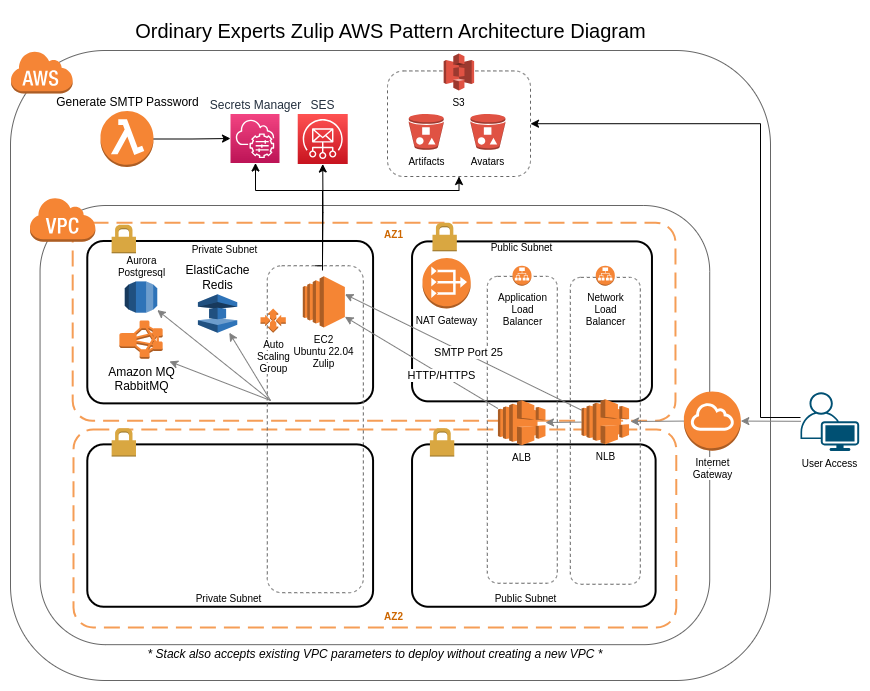
This pattern deploys a complete Zulip infrastructure including:
- Auto-scaling EC2 instances
- RDS PostgreSQL database
- ElastiCache Redis and Memcached
- S3 for file uploads
- SES for email delivery
What You'll Need
Everything required to go from this page to a running Zulip deployment.
An AWS Account
With billing enabled and permission to launch resources in the region you plan to deploy to.
A Subscription to This Pattern on AWS Marketplace
Accepting the marketplace terms is what makes the CloudFormation template available to launch in your account.
A Registered Domain Name
Pointed at the infrastructure this pattern creates — needed for your team's public URL and SSL certificate.
IAM Permissions to Launch CloudFormation Stacks
The stack creates auto-scaling EC2 instances, an RDS database, ElastiCache, and an S3 bucket on your behalf.
About 20 Minutes
For the stack to finish launching before your team can start chatting.
Up and Running in 4 Steps
Subscribe to the Zulip pattern on AWS Marketplace
Launch the CloudFormation stack in your AWS account
Configure your organization
Invite your team members — live in about 20 minutes
Self-Hosted Doesn't Mean Unsupported
Free Onboarding Session
A 1-hour call with a FOSSonCloud engineer, included with every deployment.
Ongoing Email Support
Direct line to support@fossoncloud.com whenever you need it.
Fully Open Source
Deploy on AWS Marketplace
Production-ready Zulip in your own AWS account, live in about 20 minutes.
Deploy on AWS Marketplace →