
Open WebUI
Your AI chat interface. Your AWS account. Nobody else's GPU.
A production-ready Open WebUI deployment in your own AWS account in about 20 minutes — the open-source, ChatGPT-style interface with GPU-accelerated inference, configured the way an AWS consultancy would do it for a team that wants a private LLM chat interface.
Deploy on AWS Marketplace →A Private ChatGPT Interface, Running on Your Own GPUs
Engineering Teams
A coding-assistant interface backed by models like Qwen 2.5 Coder, without sending code to a third party.
Privacy-Conscious Enterprises
Prompts and responses stay inside your own AWS account, not a vendor's API logs.
Research Labs & Academia
Run and compare open-source reasoning models without per-token billing.
Regulated Industries
Keep sensitive prompts and data off third-party AI APIs entirely.
Internal Tooling Teams
A ChatGPT-style interface for the whole org, without per-seat licensing.
AI/ML Developers
A real GPU-backed inference environment to build and test against.
If your team is sending prompts to a third-party AI API and isn't sure where that data actually goes, the next section shows what changes when inference runs inside your own AWS account instead.
What This Pattern Actually Buys You
Open WebUI itself is free and open source — the value here isn't a lower sticker price than ChatGPT, it's what changes when inference runs on GPUs inside your own AWS account instead of a third party's servers.
No Per-Seat or Per-Token Billing
Unlimited users and unlimited usage on the same GPU infrastructure — no per-seat fee like ChatGPT Team or Copilot, no per-token API metering.
Prompts Never Leave Your Account
Chat history, uploaded files, and model outputs stay inside your own VPC instead of a third party's API logs.
Choose and Swap Your Own Models
Run Qwen 2.5 Coder, Phi-4, or NVIDIA Nemotron reasoning models on your own G6/G6e instances, and change models anytime.
A flat $0.02/hr across all supported GPU instance types (g6.xlarge through g6e.12xlarge), regardless of headcount — compare that to per-seat AI chat subscriptions like ChatGPT Team (~$25–30/user/month) that scale directly with team size. You'll still pay standard AWS rates for the GPU instance itself, but the license cost doesn't grow with usage or users.
Free, Open-Source AI Chat Interface
Open WebUI is free and open source. Running it yourself means every prompt, response, and model you use stays inside your own AWS account instead of a third party's API logs.
Free & open-source, beyond the flat pattern license fee
OpenAI-compatible API for your own tooling
Prompts and data stay in your own AWS account
No per-seat or per-token pricing
Production-Ready, Following AWS Best Practices
This CloudFormation template and custom AMI deploy a complete Open WebUI environment with GPU-accelerated inference — live in about 20 minutes.
ChatGPT-Style Interface
A modern, familiar chat UI with full conversation history.
vLLM Inference Backend
High-performance serving optimized for GPU throughput.
OpenAI-Compatible API
Point your existing tools and scripts at your own endpoint.
Pre-Tested Open Models
Qwen 2.5 Coder, Phi-4, and NVIDIA Nemotron, ready to run.
What's Easy to Get Wrong, Handled By Default
Provisioning GPU instances with the right NVIDIA drivers and vLLM setup
A maintained AMI with vLLM and GPU drivers pre-configured on G6/G6e instances
Exposing an inference endpoint securely over HTTPS
Application Load Balancer across two Availability Zones, configured by default
Losing model state and chat history when an instance is replaced
EBS-backed persistent storage that survives instance replacement
Managing API keys and secrets for model access
AWS Secrets Manager integration, wired up out of the box
FOSSonCloud is built by Ordinary Experts, an AWS Consulting Partner working in Infrastructure as Code since 2014. This isn't a repackaged black-box AMI — the CloudFormation template is open source, so you can see exactly what's being deployed.
Architecture
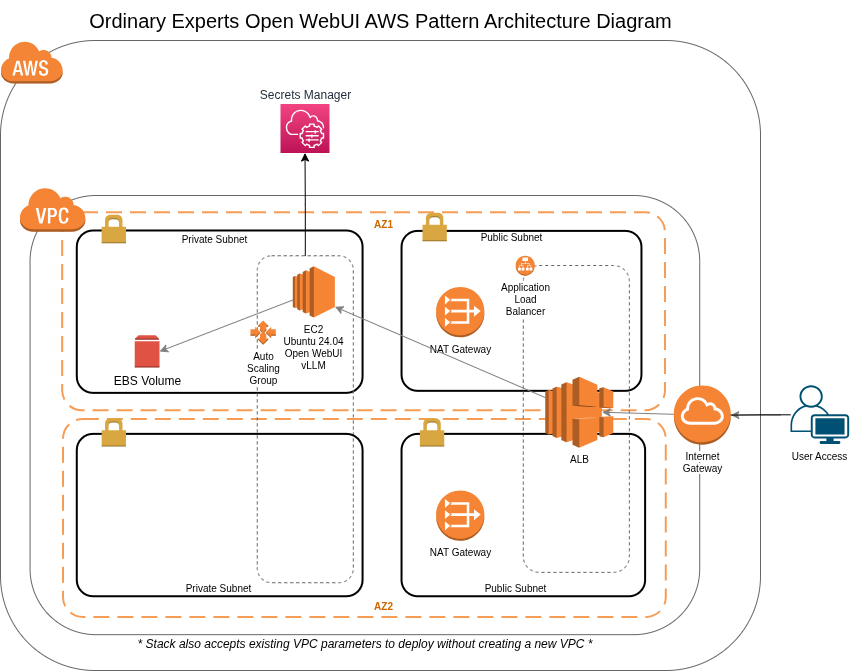
This pattern deploys a complete Open WebUI infrastructure including:
- Auto-scaling EC2 instance (Ubuntu 24.04) running Open WebUI and vLLM
- Application Load Balancer spanning two Availability Zones
- NAT Gateways for private subnet outbound access
- EBS volume for persistent model and data storage
- AWS Secrets Manager for credentials
What You'll Need
Everything required to go from this page to a running Open WebUI deployment.
An AWS Account
With billing enabled and permission to launch resources — including GPU instances — in the region you plan to deploy to.
A Subscription to This Pattern on AWS Marketplace
Accepting the marketplace terms is what makes the CloudFormation template available to launch in your account.
GPU Instance Quota (G6/G6e)
Your account needs sufficient service quota for G6 or G6e instances in your target region — new accounts sometimes need to request an increase.
A Registered Domain Name
Pointed at the infrastructure this pattern creates — needed for HTTPS access through the Application Load Balancer's SSL certificate.
IAM Permissions to Launch CloudFormation Stacks
The stack creates an auto-scaling GPU EC2 instance, an Application Load Balancer, and supporting VPC networking on your behalf.
About 20 Minutes
For the stack to finish launching before you can start chatting.
Up and Running in 4 Steps
Subscribe to the Open WebUI pattern on AWS Marketplace
Launch the CloudFormation stack in your AWS account
Choose and load your models
Start chatting — live in about 20 minutes
Self-Hosted Doesn't Mean Unsupported
Free Onboarding Session
A 1-hour call with a FOSSonCloud engineer, included with every deployment.
Ongoing Email Support
Direct line to support@fossoncloud.com whenever you need it.
Fully Open Source
Deploy on AWS Marketplace
Production-ready, GPU-accelerated Open WebUI in your own AWS account, live in about 20 minutes.
Deploy on AWS Marketplace →