
Jitsi
Your video calls. Your AWS account. Nobody else's servers.
A production-ready Jitsi Meet deployment in your own AWS account in about 20 minutes — the free, open-source Zoom alternative, configured the way an AWS consultancy would do it for an enterprise client.
Deploy on AWS Marketplace →Reliable Video Conferencing, No Per-Seat Licensing
Agencies & Consultancies
Several client-facing staff hosting calls regularly.
Healthcare Providers
HIPAA-friendly telehealth without routing patient data through a third party.
Schools & Universities
Many teacher/host accounts, without per-seat costs.
Government Agencies
Data sovereignty requirements, met by design.
Financial & Legal Firms
Meeting data stays auditable and in-house.
MSPs & IT Consultancies
Offer white-labeled video to your own clients.
If your organization already has a handful of people who regularly host meetings — not just join them — the next section shows why this usually pays for itself immediately.
Per-Seat Licensing vs. One Flat Cost
| Zoom (Pro) | Microsoft Teams (Essentials) | Google Meet (Business Starter) | This Pattern | |
|---|---|---|---|---|
| Price | $13.33/user/mo | ~$4/user/mo | ~$7.20/user/mo | $0.02/hr flat (~$14.60/mo) |
| Pricing model | Per host | Per user | Per user | Per organization |
| Billing | Annual commitment | Annual commitment | Annual commitment | Usage-based, cancel anytime |
| Meeting data lives on | Zoom's servers | Microsoft's servers | Google's servers | Your own AWS account |
| Cost as you add hosts | Scales up per host | Scales up per host | Scales up per host | Stays flat |
Competitor pricing shown is each provider's lowest paid tier that supports hosting meetings, as of 2026, billed annually — feature sets differ between tiers and providers, so this compares hosting cost specifically, not full feature parity.
Once you have more than about 5–8 people who regularly host meetings, you're likely already spending more on per-seat licensing — with Zoom, Microsoft Teams, or Google Meet — than this entire deployment costs. And that gap only grows as your team does.
Free, Open-Source Video Conferencing
No per-seat licensing, no account required for participants — and when you self-host it, your meeting data never leaves infrastructure you control. That matters if you're in healthcare, finance, education, government, or anywhere data sovereignty and compliance aren't optional.
Free & open-source, no license fees
No account required to join a call
Meeting data stays in your infrastructure
Built for compliance-sensitive teams
Production-Ready, Following AWS Best Practices
This CloudFormation template and custom AMI deploy a complete Jitsi Meet environment — live in about 20 minutes.
Automatic SSL Provisioning
Via Let's Encrypt — no manual certificate wrangling.
Auto Scaling Group
Reliability from day one, not bolted on later.
IP-Range Access Lockdown
Security configured correctly from the start.
SSM-Based Customization
Adjust configuration without forking the template.
What's Easy to Get Wrong, Handled By Default
HTTPS certificate setup — not always trivial, especially for mobile clients
Automatic SSL provisioning via Let's Encrypt
No built-in room authentication — an unconfigured deployment is a real security risk
IP-range access lockdown, configured by default
Scaling past a handful of users needs multiple, correctly load-balanced video bridges
Auto Scaling group for video bridges, built in from day one
Customizing configuration usually means forking or hand-editing the deployment
SSM Parameter-based customization, no forking required
FOSSonCloud is built by Ordinary Experts, an AWS Consulting Partner working in Infrastructure as Code since 2014. This isn't a repackaged black-box AMI — the CloudFormation template is open source, so you can see exactly what's being deployed.
Architecture
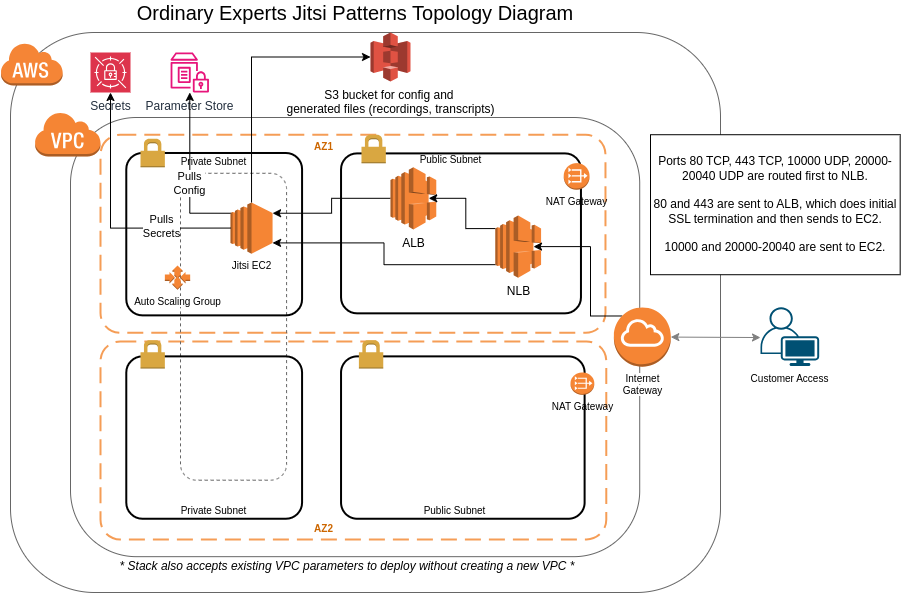
This pattern deploys a complete Jitsi infrastructure including:
- Jitsi Meet web frontend
- Jitsi Videobridge for media routing
- Prosody XMPP server
- Auto-scaling for video bridges
- S3 for recording storage
What You'll Need
Everything required to go from this page to a running Jitsi deployment.
An AWS Account
With billing enabled and permission to launch resources in the region you plan to deploy to.
A Subscription to This Pattern on AWS Marketplace
Accepting the marketplace terms is what makes the CloudFormation template available to launch in your account.
A Registered Domain Name
Pointed at the infrastructure this pattern creates — required for Let's Encrypt to issue your SSL certificate.
IAM Permissions to Launch CloudFormation Stacks
The stack creates a VPC, Auto Scaling group, and S3 bucket on your behalf, so your account needs permission to create them.
About 20 Minutes
For the stack to finish launching and SSL to provision before you can host your first meeting.
Up and Running in 4 Steps
Subscribe to the Jitsi pattern on AWS Marketplace
Launch the CloudFormation stack in your AWS account
SSL provisions automatically via Let's Encrypt
Start hosting meetings — live in about 20 minutes
Self-Hosted Doesn't Mean Unsupported
Free Onboarding Session
A 1-hour call with a FOSSonCloud engineer, included with every deployment.
Ongoing Email Support
Direct line to support@fossoncloud.com whenever you need it.
Fully Open Source
Deploy on AWS Marketplace
Production-ready Jitsi Meet in your own AWS account, live in about 20 minutes.
Deploy on AWS Marketplace →