
Drupal
Your website. Your AWS account. Nobody else's platform.
A production-ready Drupal deployment in your own AWS account in about 20 minutes — enterprise-grade CMS infrastructure, configured the way an AWS consultancy would do it for a regulated or high-traffic client.
Deploy on AWS Marketplace →Enterprise Content Management, Without Enterprise Licensing
Government Agencies
Data sovereignty requirements, met by design.
Universities & Higher Ed
Complex content structures without a per-site licensing bill.
Media & Publishing
High-traffic content delivery you fully control.
Nonprofits
Enterprise-grade CMS infrastructure on a nonprofit budget.
Digital Agencies
Manage multiple client sites without per-site platform fees.
Enterprises
Complex content structures, deployed the way your own team would build it.
If you're managing a content structure too complex for a template CMS, or answering to compliance requirements a managed platform can't fully satisfy, the next section shows what that independence is actually worth.
Managed Drupal Hosting vs. One Flat Cost
| Pantheon | Acquia | This Pattern | |
|---|---|---|---|
| Price | $50/mo+ (Basic) | $500–5,000+/mo | $0.02/hr flat (~$14.60/mo) |
| Pricing model | Per site, tiered | Per site/org | Per organization |
| Billing | Monthly/annual | Annual contract | Usage-based, cancel anytime |
| Data lives on | Pantheon's servers | Acquia's servers | Your own AWS account |
| Cost as you grow | Scales to $500–916/mo at higher performance tiers | Scales to enterprise pricing for regulated industries | Stays flat |
Pricing shown reflects each provider's publicly listed entry and enterprise tiers; feature sets and support levels differ meaningfully between tiers, so this compares hosting cost specifically, not full feature or service parity. WordPress-only hosts like Kinsta and WP Engine don't support Drupal, so they're not included here.
Enterprise Drupal hosting on platforms like Acquia commonly runs $500–$5,000+/month, especially for regulated industries — this pattern costs about $15/month flat, running the same open-source Drupal core underneath.
Free, Open-Source Content Management
Drupal core has always been free and open source — managed hosting platforms charge for convenience and an opinionated deployment pipeline, not for the software itself. Self-hosting avoids being locked into any one platform's workflow.
Free & open-source, no license fees
No vendor lock-in to one platform's pipeline
Content data stays in your infrastructure
Independently auditable for compliance needs
Production-Ready, Following AWS Best Practices
This CloudFormation template and custom AMI deploy a complete Drupal environment — live in about 20 minutes.
Enterprise-Ready
Built for large-scale deployments.
Flexible Content Types
Create custom content structures.
Robust Security
Regular security updates and best practices.
Deployment Pipeline
Built-in CI/CD support.
What's Easy to Get Wrong, Handled By Default
Configuring a CDN and caching layer correctly for Drupal's render pipeline
CloudFront CDN, wired up and tuned for you
Setting up a WAF and keeping its rules current
WAF security, configured and maintained as part of the pattern
Managing shared file storage across multiple app servers
EFS shared storage, built in from day one
Tuning a database cluster for content-heavy workloads
Aurora MySQL cluster, sized for production
FOSSonCloud is built by Ordinary Experts, an AWS Consulting Partner working in Infrastructure as Code since 2014. This isn't a repackaged black-box AMI — the CloudFormation template is open source, so you can see exactly what's being deployed.
Architecture
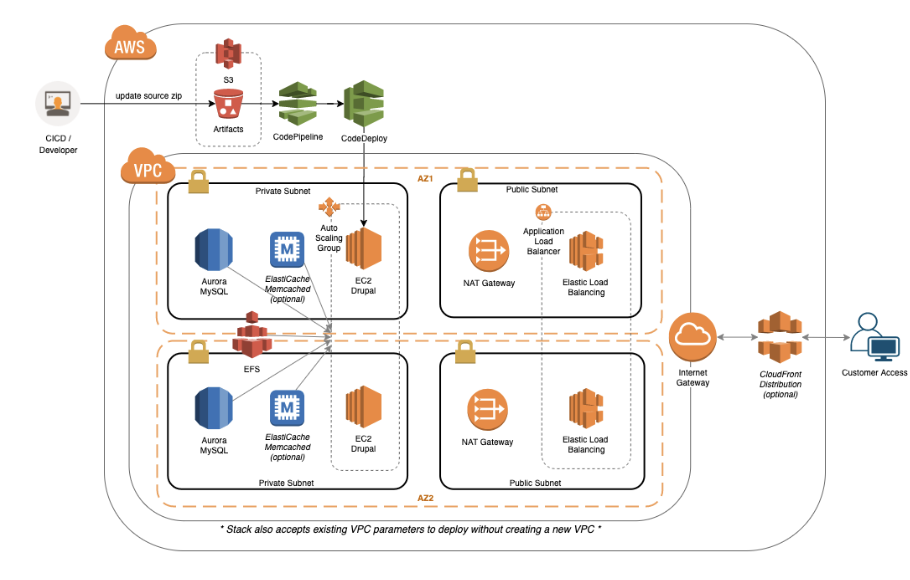
This pattern deploys a complete Drupal infrastructure including:
- Auto-scaling EC2 instances
- Aurora MySQL database cluster
- EFS for shared file storage
- CloudFront CDN
- WAF for security
What You'll Need
Everything required to go from this page to a running Drupal deployment.
An AWS Account
With billing enabled and permission to launch resources in the region you plan to deploy to.
A Subscription to This Pattern on AWS Marketplace
Accepting the marketplace terms is what makes the CloudFormation template available to launch in your account.
A Registered Domain Name
Pointed at the infrastructure this pattern creates — needed for your site's public URL and SSL certificate.
IAM Permissions to Launch CloudFormation Stacks
The stack creates auto-scaling EC2 instances, an Aurora MySQL cluster, EFS storage, and a CloudFront distribution on your behalf.
About 20 Minutes
For the stack to finish launching before your Drupal site is live.
Up and Running in 4 Steps
Subscribe to the Drupal pattern on AWS Marketplace
Launch the CloudFormation stack in your AWS account
Run the Drupal installation wizard
Start building your website — live in about 20 minutes
Self-Hosted Doesn't Mean Unsupported
Free Onboarding Session
A 1-hour call with a FOSSonCloud engineer, included with every deployment.
Ongoing Email Support
Direct line to support@fossoncloud.com whenever you need it.
Fully Open Source
Deploy on AWS Marketplace
Production-ready Drupal in your own AWS account, live in about 20 minutes.
Deploy on AWS Marketplace →